I have been enjoying Josh Comeau’s course on CSS for JS devs. It teaches how to use CSS not for documents but for apps — that is, for defining the layout of a web app or of UI components which you integrate to make a web app.
It’s titled “for JS devs” but these principles are more general. So let’s see how we can use some of them to define “CSS for FastHTML devs”, using SolveIt.
In module 3 of his course, Josh gives an example of using the styled components library to define a component for presenting quotations nicely. I don’t want to quote too liberally from his course, since it is a paid course. However, I will translate one example and see how it looks in FastHTML. And, I will show how the general principles from the styled-components library might be translated into FastHTML.
(If this interests you I thoroughly recommend his course, which is a tour de force.)
Our goal is to have a component which produces a nicely formatted quote like this one:
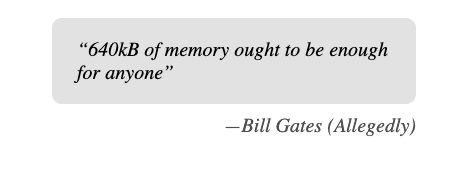
whenever someone calls a FastHTML function like so:
Quote("640kB of memory ought to be enough for anybody", by:"Bill Gates (Allegedly")Here are the pieces we will need:
- a way to define a custom component, which means, a UI element which can be treated as atomic when it is used by a consumer.
- a way to scope styles. By this I mean, a way to apply styles to the component, such that our component does not modify other elements on the page.
Building a custom component tree
First let’s define HTML elements which we will use to build our component:
from fasthtml.common import Cite, A, Blockquote, Figure, FigcaptionNow let’s consider how we define our own FT element in FastHMTL
We’re going to aim for a target structure where a <Quote> element is built of the following tree:
    <figure>
      <QuoteContent>
        {children}
      </QuoteContent>
      <figcaption>
        <Author>
          <SourceLink href={source}>
            {by}
          </SourceLink>
        </Author>
      </figcaption>
    </figure>
and where QuoteContent is a <blockquote>, Author is a <cite>, and SourceLink is an <a>.
There are two things to notice here. First, that we’re introducing new, semantic elements, to represent the conceptual parts of a quote. This makes it easier for someone working with the code.
Second, that we’re being bit fancy by leaning into the correct semantic HTML, using <figure> to wrap the entire quote, and <figcaption> to separate the author from the quotation itself. This makes the HTML more semantic, and more accessible.
We can define new FT elements (FastHTML tags) directly, by simply defining functions. We will the *c and **kw idioms in order to pass through the positional and keyword args.
def QuoteContent(*children, **kw): return Blockquote(*children, **kw)
def Author(*children,**kw): return Cite(*children,**kw)
def SourceLink(*children,**kw): return A(*children,**kw)
Now we can define a Quote FT tag, which is built of those pieces.
def Quote(*children, by:str, source:str):
    return Figure(
        QuoteContent(*children),
        Figcaption(
            Author(
                SourceLink(by,href=source))))
q = Quote("640kB of memory ought to be enough for anyone",by="Bill Gates",source="https://quoteinvestigator.com/2011/09/08/640k-enough/")
q640kB of memory ought to be enough for anyone
Here the SolveIt environment is automatically converting those FT tags into HTML and then rendering that HTML.
We can examing the underlying XML representation to be sure it is what is expected.
from fastcore.xtras import hl_md
hl_md(q)<figure><blockquote>640kB of memory ought to be enough for anyone</blockquote><figcaption><cite><a href="https://quoteinvestigator.com/2011/09/08/640k-enough/">Bill Gates</a></cite></figcaption></figure>Looks good!
Adding scoped styles
One Basic Idea in defining reusable components is styling them in a way that is scoped. This means simply that when someone uses the component, the component looks right and it doesn’t cause things outside the component to look wrong.
In other words, the component’s styles don’t leak outside the component.
This can be challenging in CSS, because CSS provides many ways to apply styles too broadly. For instance, if we styled the <blockquote> tag, then all <blockquote> tags on the page would be styled. We don’t want that. This containment is one of the reasons people use CSS-in-JS libraries like styled-components, or heavier libraries like React, or naming conventions like Block-Element-Modifier.
If you look at it from the eyes of someone more used to native development (that’s me!), it might even seem that there’s a huge farrago of methods & tools which exist essentialy as workarounds to introduce modularity constructs which are missing from the problematic foundations provided by CSS itself. But I’ll skip the manifesto!
For now, the practical question is, if we’re defining components in FastHTML what is a straightforward way to apply styles and to apply them in a way that is contained?
Let’s start with the simplest possible thing, by just applying the styles inline to the style attribute:
quote_content_styles = """
  margin: 0;
  background: hsl(0deg 0% 90%);
  padding: 16px 20px;
  border-radius: 8px;
  font-style: italic;
"""

author_styles = """
  display: block;
  text-align: right;
  margin-top: 8px;
"""

sourcelink_styles = """
  text-decoration: none;
  color: hsl(0deg 0% 35%);
"""
def QuoteContent(*children, **kw): return Blockquote(*children, style=quote_content_styles)
def Author(*children,**kw): return Cite(*children,style=author_styles)
def SourceLink(*children,**kw): return A(*children,style=sourcelink_styles)def Quote(*children, by:str, source:str):
return Figure(
QuoteContent(*children),
Figcaption(
Author(
SourceLink(by,href=source))))q = Quote("640kB of memory ought to be enough for anyone",
by="Bill Gates (Allegedly)",
source="https://quoteinvestigator.com/2011/09/08/640k-enough/")
q640kB of memory ought to be enough for anyone
That might not look right, depending on your browser environment. Let’s protect rendering from the notebook, so we can control the component’s appearance precisely:
from fasthtml.common import showq = Quote("640kB of memory ought to be enough for anyone",
by="Bill Gates (Allegedly)",
source="https://quoteinvestigator.com/2011/09/08/640k-enough/")
show(q,iframe=True)Not bad! Let’s inspect the raw output agian
from fastcore.xtras import hl_md
hl_md(q)<figure><blockquote style="
margin: 0;
background: hsl(0deg 0% 90%);
padding: 16px 20px;
border-radius: 8px;
font-style: italic;
">640kB of memory ought to be enough for anyone</blockquote><figcaption><cite style="
display: block;
text-align: right;
margin-top: 8px;
"><a href="#" style="
text-decoration: none;
color: hsl(0deg 0% 35%);
">Bill Gates (Allegedly)</a></cite></figcaption></figure>Good. As expected.
Supporting nested CSS selectors
However, we have a problem if we want to use some more advanced CSS, like nested selectors, like the &::before selector in order to define a style rule which will automatically add typographer’s quotation marks around the quote, and add an em-dash to mark off the author.
Unfortunately, we can’t just add that to our CSS, because nested selectors are not supported for inline styles.
We can see this by noticing that adding such selectors has no effect:
quote_content_styles = """
  margin: 0;
  background: hsl(0deg 0% 90%);
  padding: 16px 20px;
  border-radius: 8px;
  font-style: italic;

  &::before {
    content: '“';
  }
  &::after {
    content: '”';
  }
"""

author_styles = """
  display: block;
  text-align: right;
  margin-top: 8px;
"""

sourcelink_styles = """
  text-decoration: none;
  color: hsl(0deg 0% 35%);

  &::before {
    content: '—';
  }
"""
q = Quote("640kB of memory ought to be enough for anyone",
by="Bill Gates (Allegedly)",
source="https://quoteinvestigator.com/2011/09/08/640k-enough/")
show(q,iframe=True)Looks the same, alas. No smart quotes are to be seen.
from fastcore.xtras import hl_md
hl_md(q)<figure><blockquote style="
margin: 0;
background: hsl(0deg 0% 90%);
padding: 16px 20px;
border-radius: 8px;
font-style: italic;
&::before {
content: '“';
}
&::after {
content: '”';
}
">640kB of memory ought to be enough for anyone</blockquote><figcaption><cite style="
display: block;
text-align: right;
margin-top: 8px;
"><a href="#" style="
text-decoration: none;
color: hsl(0deg 0% 35%);
&::before {
content: '—';
}
">Bill Gates (Allegedly)</a></cite></figcaption></figure>We can even see the AMPERSAND characters are there (HTML encoded) but having no effect.
So in order to be able to use this CSS feature in a FastHTML component, we will need to apply the CSS by some mechanism besides simply inserting it in the style attribute.
One possible mechanism is basic CSS preprocessing.
Rather than defining something very general, let’s just implement it in our component definition to see the pattern.
Instead of applying the style inline, we will define unique IDs for the component constituents, and build a stylesheet which addresses those components by their unique IDs
def QuoteContent(*children, **kw): return Blockquote(*children, **kw)
def Author(*children,**kw): return Cite(*children,**kw)
def SourceLink(*children,**kw): return A(*children,**kw)
import uuid
from fasthtml.common import Style
def Quote(*children, by:str, source:str):
styles = [quote_content_styles,author_styles,sourcelink_styles]
ids = ["q"+str(uuid.uuid4()) for _ in range(len(styles))]
rules = ["#" + idstr + " {" + rule + "}" for idstr,rule in zip(ids,styles)]
css = '\n'.join(rules)
return Figure(
Style(css),
QuoteContent(*children,id=ids[0]),
Figcaption(
Author(SourceLink(by,href=source,id=ids[2]),
id=ids[1])))q = Quote("640kB of memory ought to be enough for anyone",
by="Bill Gates (Allegedly)",
source="https://quoteinvestigator.com/2011/09/08/640k-enough/")
show(q,iframe=True)Triumph!
And let’s have a peek inside the HTML to confirm that everything is working as expected. Namely — that we are generating a set of CSS rules with unique IDs, and applying them to the elements as needed, and then generating HTML with IDs so the elements received the rules:
from fastcore.xtras import hl_md
hl_md(q)<figure><style>#q90617aff-d0f4-4636-9b0b-b04b057dc406 {
margin: 0;
background: hsl(0deg 0% 90%);
padding: 16px 20px;
border-radius: 8px;
font-style: italic;
&::before {
content: '“';
}
&::after {
content: '”';
}
}
#qeb5a9e4a-741e-4025-b196-4d5b86273a8c {
display: block;
text-align: right;
margin-top: 8px;
}
#qa5563ddd-d16b-43f5-9796-e47a5f9a03d3 {
text-decoration: none;
color: hsl(0deg 0% 35%);
&::before {
content: '—';
}
}</style><blockquote id="q90617aff-d0f4-4636-9b0b-b04b057dc406">640kB of memory ought to be enough for anyone</blockquote><figcaption><cite id="qeb5a9e4a-741e-4025-b196-4d5b86273a8c"><a href="https://quoteinvestigator.com/2011/09/08/640k-enough/" id="qa5563ddd-d16b-43f5-9796-e47a5f9a03d3" name="qa5563ddd-d16b-43f5-9796-e47a5f9a03d3">Bill Gates (Allegedly)</a></cite></figcaption></figure>Recap
So what have we seen?
- We’ve seen an example of using FastHTML to define a simple component, one for representing a quotation.
- We’ve seen a component style of design, where we define new semantic tags which use other semantic tags
- We’ve seen how to scope simple CSS styles to the element, by using
styleattribute for inline styles - We’ve also seen how we can scope more complex styles, by defining our own little CSS preprocessor, which generates unique IDs for the component elements and then applies those IDs to the elements and to the CSS rules
Now for the next question: why bother? is this necessary?
In one sense, it is not necessary. We don’t need to define a tag Quote or Author. We don’t even need to scope our CSS, as long as we remember to be careful everywhere else never to do anything that might be affected by our CSS. In the end, it all just translates to standard HTML elements.
But, it might neverthless be extremely handy, if you found yourself wanting to use this Quote component repeatedly. Then, to use it, you only need to supply three strings, and not think further about how it is implemented.
This is a roundabout way of saying what might be obvious, which is that components define abstractions, and good abstractions are useful because they let you ignore details and focus on a higher level of the problem. Whether it’s worth the fuss to write your FastHTML in a component style is, of course, entirely up to you! But if you want to, just do it. It’s pretty straightforward.
Next Steps / Fun Exercise:
In this dialog, I built a custom CSS preprocessor into the definition of Quote itself, in order to handle nested selectors. But say you expected to be defining dozens of custom FT elements, and you wanted to be able to use nested selectors freely. How would you generalize this approach so it was more automatic?
Here are some approaches to try:
- Generzalize the “CSS preprocessor” into a helper function or library.
- Try using an external library like css-scope-inline
- Explore the css @scope rule
Which of these is better? (Here’s a secret… I’m not actually sure. Please tell me if you find out!)